
The short answer: choose by limits, not by a title alone
The best Nucleus Co-op games for 3 players are the ones whose current handler documents the required player range, launch method, input path, and connection step. A title can appear in a games directory and still need a particular edition, launcher, mod, or game build. Start with a game that launches normally outside Nucleus Co-op, then confirm that the handler can open the number of instances your group needs.
For a three-player evening, treat four questions as a gate. Can the handler create three usable windows? Can each person control only one instance? Does the game provide a local, LAN, online, or mod-based way for those instances to meet? Can you save and exit without mixing profiles or overwriting a valuable world? If one answer is unclear, the game is a candidate for a short test, not a guaranteed recommendation.
This page is deliberately narrower than the best-games-by-play-style guide and the full Nucleus Co-op games list. Those pages help you browse categories and entries. Here the output is a group-size decision: which candidate is easiest to validate for three people, what equipment it needs, and when to stop before a long session creates confusing files or input problems.
How to judge a three-player Nucleus Co-op candidate
A useful candidate has evidence at the same level as the decision you are making. The game directory can tell you that a handler exists, but a three-player plan needs more: a current handler note, the supported game edition, any required launcher or mod, and a visible player boundary. Official Nucleus Co-op game guides often expose these fields directly. Community notes can add practical warnings, but they should not replace the source or version check.
Read the handler notes before downloading a second copy of anything. Look for the expected executable, the launch order, controller recommendations, and whether the game uses local multiplayer, LAN, an online service, or a community component. A window count is not the same as a supported session. Three windows may open while the game still limits the connection to two players or requires a particular host and join order.
Use a confidence label while you compare. Documented means the source states the player range and setup path. Plausible means the local entry and a recent report suggest the path, but the exact build still needs a test. Unclear means the page does not identify the handler boundary or connection method. Only the first two labels belong in a game-night shortlist, and both still need a disposable first run.
| Check | What a three-player answer should contain |
|---|---|
| Player boundary | A handler or game guide that identifies 3 players or a 2–4 player range. |
| Game edition | The exact PC release, launcher, executable, and build being tested. |
| Input path | Three distinct controllers, or a documented mix of keyboard, mouse, and controllers. |
| Connection | The game's own local, LAN, online, or mod-based route, including host order. |
| Save boundary | Instance folders, shared profiles, backup steps, and a safe disposable test. |
| Recovery | A clear symptom and next check if one window, input, or join step fails. |
Shortlist Nucleus Co-op games for 3 players by session type
The local inventory gives you a practical starting set, but it should be read as a set of checks rather than a permanent ranking. For a shared-world session, Core Keeper and Palworld are useful candidates because the decision includes world saves, connection timing, and whether each instance stays independent. For a repeatable action session, Risk of Rain 2 and the Call of Duty entries give you a shorter loop: open the instances, assign inputs, connect, play a small run, and close cleanly.
Minecraft Java is a different kind of three-player choice. The launcher, Java or Bedrock distinction, profile, mod loader, and world folder all matter before you discuss the number of players. It can suit a group that accepts more preparation, but a disposable world and a precise version record are essential. Do not copy a Bedrock setup into a Java plan or assume that one handler's save behavior applies to another game.
Vampire Survivors and Devil May Cry 5 can be considered when the current game-specific notes match your build and input devices. Their setup questions are not identical: one may focus on native co-op boundaries and compact runs, while the other may depend on a community component. The right shortlist therefore has a reason beside every title, such as shared-world exploration, four-controller action, or a low-risk repeatable run.
If you need four people rather than three, do not simply add a fourth window to the same plan. A Nucleus Co-op 4 player games search still has to pass the same handler, input, connection, and save checks. Screen layout, USB or Bluetooth device order, frame-time load, and the game's own player cap can change when the fourth instance starts. Mark four-player candidates separately and test the maximum count before advertising a group session.
- Shared world: Core Keeper or Palworld, with a disposable world and a documented save boundary.
- Short action run: Risk of Rain 2 or a Call of Duty entry, with a repeatable input and connection test.
- Sandbox preparation: Minecraft Java, only after the launcher, profile, version, and world path are recorded.
- Compact or special-case session: Vampire Survivors or Devil May Cry 5, only when the current handler notes fit.
- Four-player expansion: treat it as a separate test and confirm the handler's maximum player guidance.
Compare controllers, windows, and connection load
Three-player planning fails most often at the boundaries between layers. Windows can open correctly while two controllers still reach the same instance. Inputs can be isolated while the game refuses the join step. A session can connect while the save path is shared. Check these layers in order so a display symptom does not send you into network settings and a network symptom does not make you replace a working controller setup.
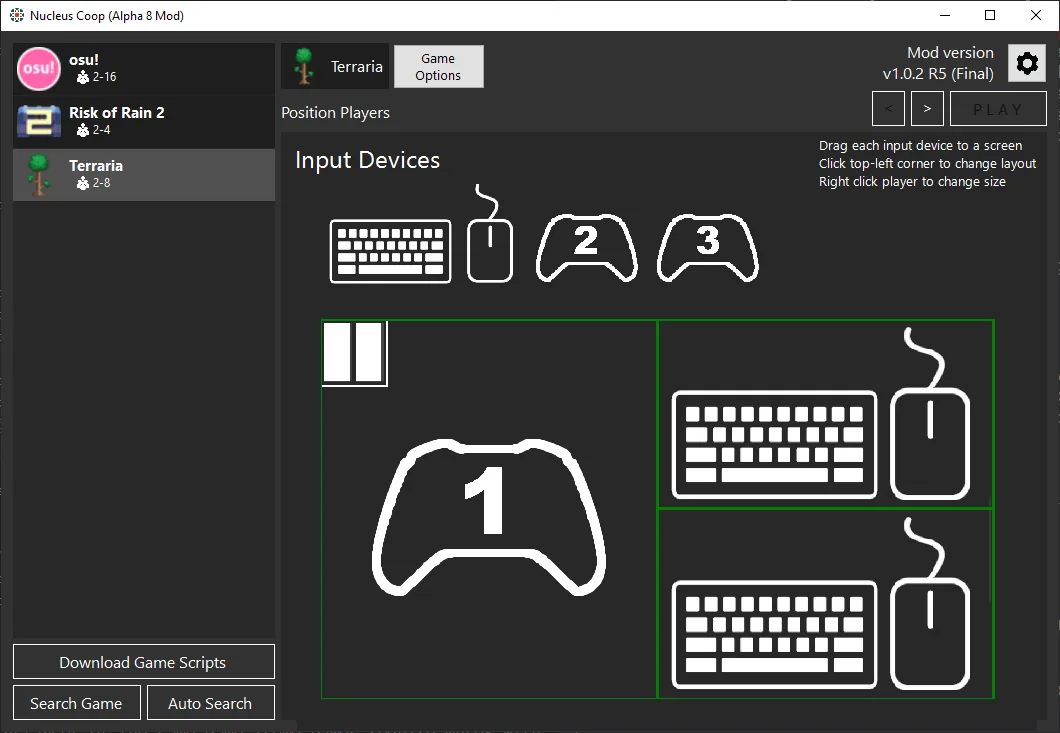
Start with known devices. Plug in or pair the three controllers before launching the handler and confirm that Windows lists each one once. Xbox-style XInput is often the simplest baseline, but the handler may document another input path. Add PS4, PS5, Joy-Con, keyboard, mouse, remappers, or virtual devices only after the baseline works; mixed device order can change which player receives an input.
Then estimate the desktop load. Three windows need enough space to remain readable, and a fourth window can change frame time, focus, and mouse position. Use the handler's default layout for the first run. If the game has a local or LAN join step, follow that game's sequence. Nucleus Co-op coordinates supported processes and inputs; it does not create a universal multiplayer service or remove a game's own account and network rules.
Count the devices
Confirm that Windows sees three intended controllers once each and that no remapper is duplicating them.
Count the windows
Open the handler's expected number of instances and keep the default layout for the baseline.
Move one player
Test movement and menu input in one window at a time before attempting the game's join step.
Record the connection
Write down whether the game uses local, LAN, online, or mod-based connection and which instance hosts.
Run a low-risk first test before game night
A first test should answer one question at a time and leave you with a clean stop point. Launch the legitimate game outside Nucleus Co-op, make sure the save or profile loads, and record the game build. Close unrelated overlays and input tools. Keep the application and handler in a writable path and back up any world or profile that matters before you create multiple instances.
For a three-player test, use a short level, a disposable world, or a menu-to-checkpoint route. Confirm the number of windows, each player's input, the game's connection stage, and one save or checkpoint. Then close the instances in the documented order and inspect which folders changed. A successful launch without a successful save and clean exit is only a partial result.
If a test fails, do not change five variables at once. Record the stage: handler download, instance creation, window layout, input assignment, game loading, connection, save, or exit. Compare the exact handler and game versions with the source you used. The troubleshooting page is most useful after you can name that stage. If the cause is unclear, stop at two players instead of risking a long three-player session.
Verify the game
Launch it normally, note the edition and build, and open a backed-up or disposable profile.
Read the current handler
Check the player range, required launcher or mod, launch order, controller path, and connection notes.
Test three inputs
Move one player at a time, open a menu, and confirm that the other instances do not react.
Test the session
Join using the game's documented method, reach a safe checkpoint, and confirm the save boundary.
Write a stop note
Record what worked, what changed, and the exact failure stage before trying a new variable.
What can change after a handler or game update
A three-player recommendation has a date and a version boundary, even when the title itself has not changed. A game patch can move an executable, alter a launcher, change input behavior, or update its connection rules. A handler update can change instance folders, window placement, player limits, or the required launch sequence. Keep the source URL and the check date beside your test record so you know which combination actually worked.
When a previously working session breaks, repeat the smallest baseline first: normal game launch, handler selection, two windows, two inputs, then the connection stage. Add the third player only after the baseline is stable. This separates a handler regression from a hardware or network change. It also gives you a useful report for the official project or handler support channel instead of a vague statement that multiplayer stopped working.
Do not copy an old archive from a random mirror to make the page's recommendation look stable. Use the official release or handler source where available, verify the game edition, and keep the original files separate from test files. The purpose of this Nucleus Co-op games for 3 players guide is a safer decision process: a candidate can be promising and still need a fresh check after an update.
| If this changed | Repeat this check |
|---|---|
| Game patch or edition | Executable path, launcher, version, profile, and normal launch. |
| Handler update | Player guidance, launch order, instance folders, and input API. |
| Controller or remapper change | Windows device list, device order, and one-player isolation. |
| Network or firewall change | The game's own host, join, LAN, or online step. |
| Save or profile change | Backup, instance folder, checkpoint, and clean exit behavior. |
Practical notes for a stable setup
Nucleus Co-op games for 3 players FAQ
What are the best Nucleus Co-op games for 3 players?
Start with a title whose current handler documents a 3-player or 2–4 player range, a clear input path, and a repeatable connection step. Use the shortlist on this page as candidates, then verify the exact build and run a disposable test.
Does Nucleus Co-op support four players?
Some handlers and games document 2–4 players, but the limit is game and handler specific. A fourth window can change input order, screen space, frame time, and connection behavior, so test the maximum count separately.
Do I need three controllers for a three-player session?
Not always. The handler may document a keyboard and mouse path or a mix of devices, but three known controllers are the simplest baseline. Confirm the input API and device order before adding remappers or virtual devices.
Can three Nucleus Co-op instances play online together?
Only when the game and handler provide a supported local, LAN, online, or mod-based connection route. Nucleus Co-op coordinates supported processes; it does not add a universal online service.
Why do three windows open but only two players join?
Window creation and game session limits are separate. Check the handler's player guidance, game mode, launcher, connection order, and exact build before changing display or controller settings.
Is it safe to test a shared-world game with three players?
Use a backed-up or disposable world, inspect instance folders, reach a small checkpoint, and confirm a clean exit before importing a valuable save. Stop when the save boundary is unclear.
Where do I find more Nucleus Co-op games?
Use the games directory for current entries and handler notes, then open the title-specific guide when available. Treat an entry as a starting point and recheck its source after a game or handler update.
What should I record when a three-player test fails?
Record the game edition and build, handler version or date, launcher, number of windows, controller assignment, connection stage, save path, and exact error message. Change one variable at a time.
Start with the documented game path
Choose a candidate from the games directory, prepare a clean installation, and use the controller and troubleshooting guides to keep the first three-player session reversible.
Open the Nucleus Co-op games list